
Less busywork.
More ready to list.
Research products, build eBay listings, track inventory, handle returns, and ring up counter sales in one focused Windows workspace. Meet Gruffin.
Public downloads and sales are coming soon.
the way you sell.From the product in your hand to a listing you can review.
Keep your selling
moving forward.
Spend less time moving between tools. Gruffin brings the core parts of your listing workflow together, with you in control of what gets published.
Start with what
you know.
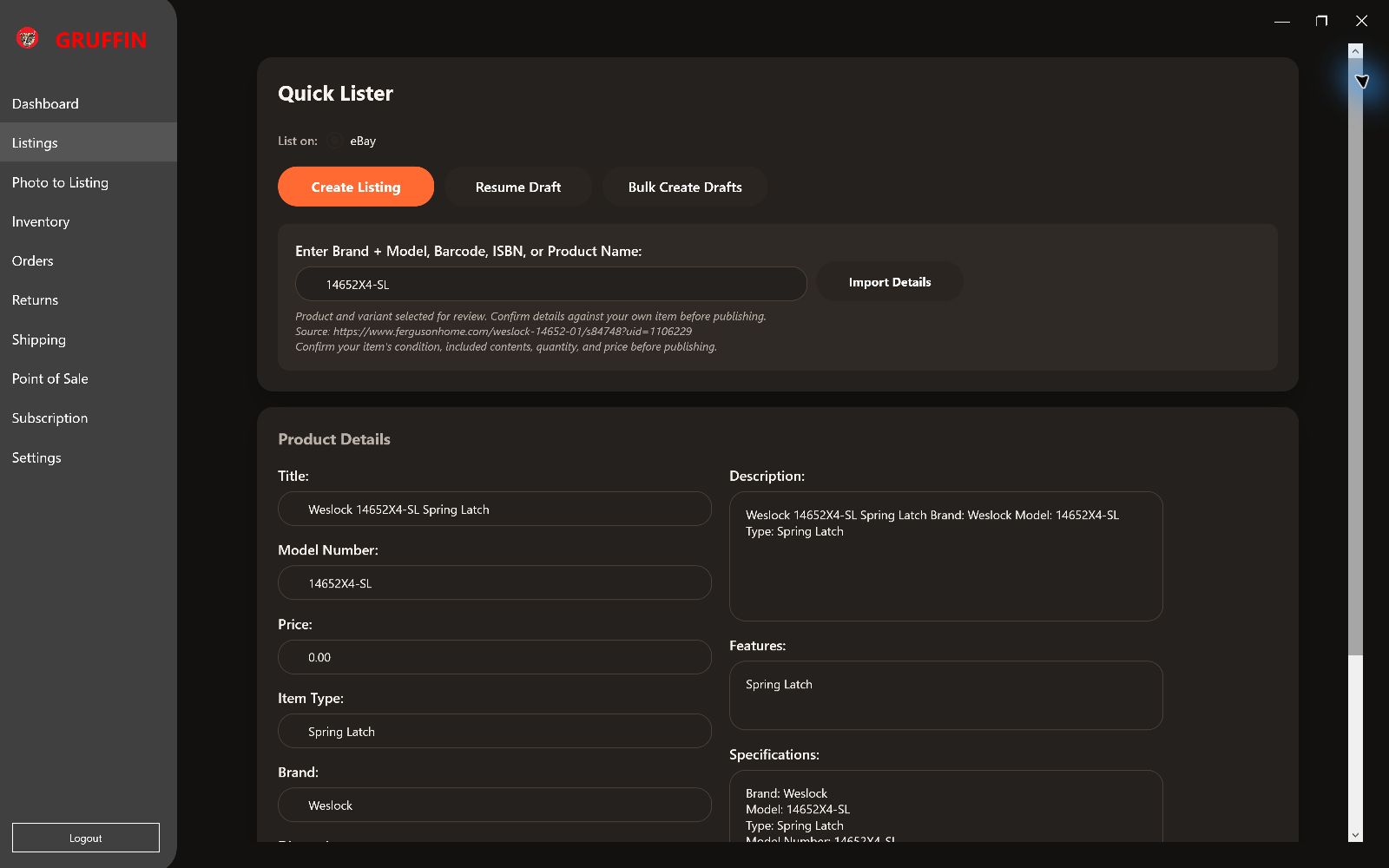
Look up a brand, model, barcode, ISBN, or product name. AI-assisted web research brings product details and source references into your listing draft.
Turn details into
your next listing.
Use Quick Lister or start with product photos. Review descriptions, refine titles, and confirm the exact item before creating your eBay listing.
A workspace for
the bigger picture.
Manage inventory and refresh connected listings and orders. Professional and Enterprise plans add sales analytics to help you review performance.
A useful head start.
You make the
final call.
Product research should help you make a better listing—not make decisions about an item it has never held.
Identify your item
Enter the strongest clues you have, or begin in Photo to Listing. Exact model numbers and barcodes help narrow the match.
Check the match and the source
Review the product, finish, variant, and supporting details. New web lookups can take time, and AI results may be incomplete or incorrect.
Make the listing yours
Add your own photos, condition, price, quantity, and included contents. Confirm the details before publishing to eBay.
From the next sale
to the returned item.
See how Gruffin brings your counter, eBay stock, returns, and an existing Excel inventory sheet into the same workspace.
54-second guided tour of actual Gruffin screens using sample inventory. Captions are shown in the video. No live orders, payments, or customer records appear.
Read the video transcript
A register built for ringing up items Scan a saved barcode or SKU. Keep the running ticket and amount due in view.
Scan. Add. Keep moving. A matched SKU goes straight onto the ticket. Ambiguous searches ask you to choose.
Clear totals. Correct change. Adjust quantities and unit prices. Cash shows the amount to collect or the change due.
eBay sales update matching inventory Sold price, sale date, quantity sold and remaining stock stay tied to the order line.
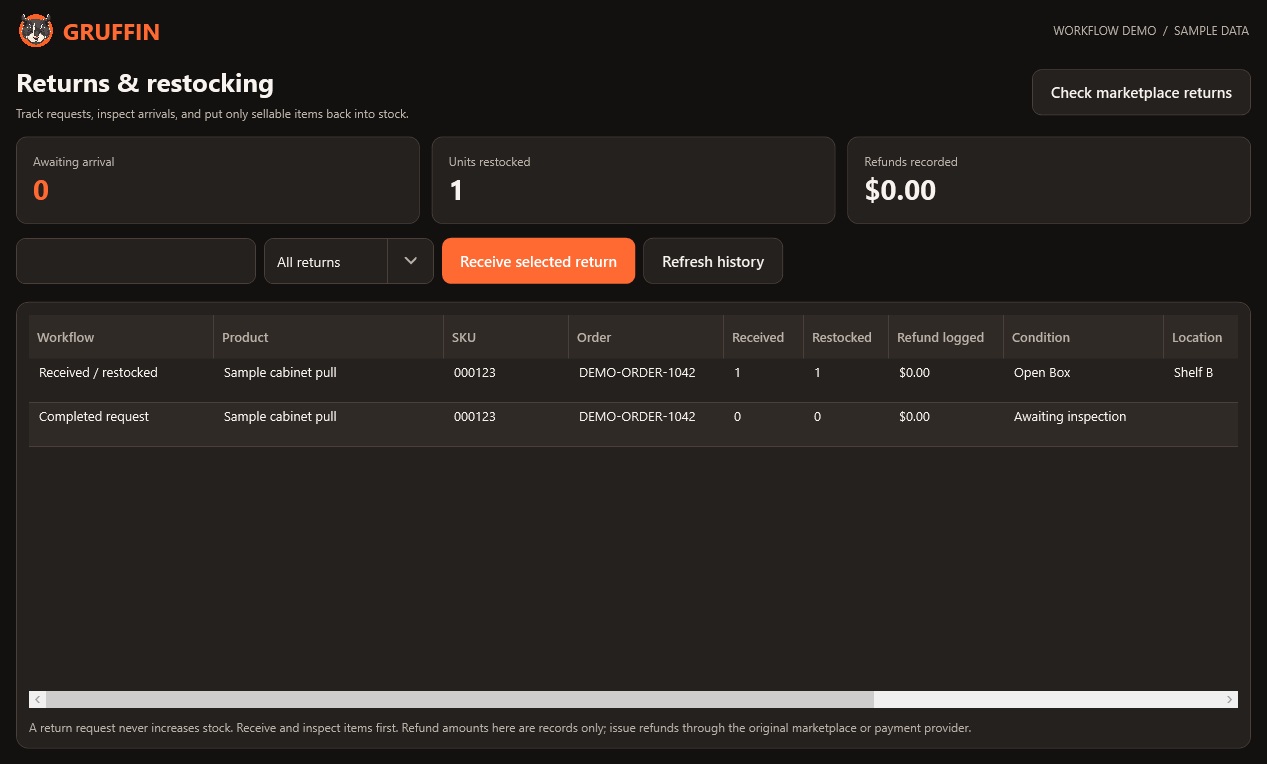
A request is not a restock Marketplace returns enter the queue. Sellable stock stays unchanged until the item arrives.
Receive it. Inspect it. Choose the outcome. Add inspected items to sellable stock, or hold damaged returns out of stock. Refund entries are records only.
Choose what can be sold again Record condition and location. Keep damaged or uninspected items out of available stock.
A complete return history The request closes, the received unit is restocked once, and the original sale history is preserved.
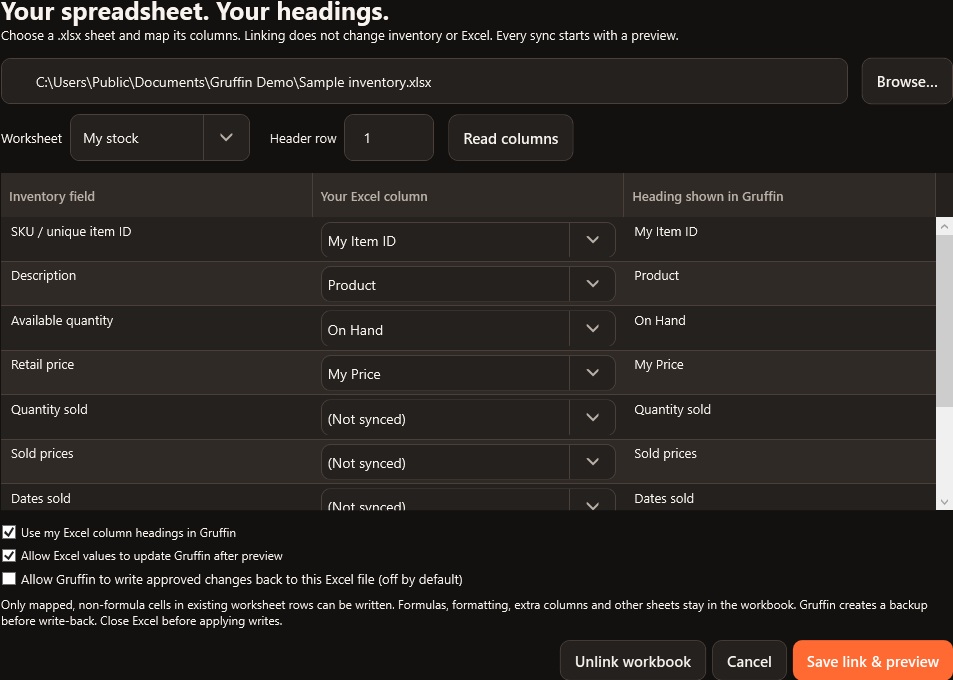
Keep the spreadsheet you already use Choose a worksheet, map your headings and decide whether write-back is allowed. It starts off.
Every Excel sync starts with your review Choose which value to keep. Conflicts default to Skip. Approved workbook writes create a backup.
Your column names. Stable connections. Use Excel headings or rename them in Gruffin. The underlying field mappings keep working.
A sale should
leave a record.
Paid eBay sales update the matching inventory SKU with the product sale price, sale date, quantity sold, remaining quantity, and eBay as the sales channel. Order-line tracking keeps repeated refreshes from counting the same sale again.
Automatic checks run while Gruffin is open. Refresh Orders for a check now. Unmatched SKUs stay unchanged until they can be matched safely.
Scan it.
Ring it up.
Use a saved barcode or SKU to add an item to a clear running ticket. Adjust quantities and prices, see cash still due or change to give, and finish at an always-visible checkout button.
Card payments use hosted Stripe checkout in a browser and require Stripe connection setup. Gruffin waits for payment confirmation before finishing a card sale.
Specifics that fit
the category.
The listing wizard loads eBay’s current required and recommended item specifics, including allowed choices and fields that accept multiple values. Review the product, condition, and specifics before publishing.
AI research assists with identification. Your own item and supporting sources remain the final check.
Receive first.
Restock with a decision.
A marketplace return request enters the queue without increasing available stock. When the item arrives, record the quantity, inspect its condition, choose a storage location, and decide whether it can be sold again.
- Partial receipts and duplicate-receipt protection
- Sellable restocks or damaged items held out of stock
- Refund-only records with no stock movement
- Original sale history and a return audit trail
Gruffin records refunds; it does not issue money back to a buyer. Process the actual refund through the marketplace or original payment provider.
Keep your sheet.
Keep your headings.
Link a .xlsx inventory workbook, pick the worksheet and header row, and map your own column names to Gruffin’s fields. Use those headings in the app or rename them later—the field mapping keeps working.
- Import-only access is the starting point
- Enable Excel write-back only when you want it
- Review changes and resolve conflicts before each sync
- Backups before approved Excel writes
Only mapped, non-formula cells in existing worksheet rows are eligible for write-back. Other sheets and unmapped columns are preserved. Sync does not append or delete Excel rows. CSV and older .xls files can still be imported separately.
You stay in control. Excel sync is a deliberate preview-and-apply action. If the workbook or inventory changes after the preview, Gruffin asks for a fresh comparison. The connected order feed and API lookback limits determine which marketplace updates are available.
Start where you are.
Room to grow.
Start Free. Three paid plans. Monthly or yearly billing.
Compare plans and billing details ↗
Free
- 10 active listings published through Gruffin
- 50 saved inventory items
- 10 shared AI actions per month
- Orders, shipping queue, returns and POS
- Assisted marketplace drafts
Basic
- 100 Gruffin-published active listings
- 500 inventory items
- 100 shared AI actions per month
- Reviewed Excel sync and bulk tools
- Assisted drafts for three marketplaces
Professional
- 1,000 Gruffin-published active listings
- 5,000 inventory items
- 500 shared AI actions per month
- Analytics and custom listing branding
- Priority support
Enterprise
- No Gruffin plan cap on active listings
- No Gruffin plan cap on inventory items
- 1,500 shared AI actions per month
- Analytics, branding and bulk tools
- Priority support
Planned public pricing. Sales are not open yet. All plans include inventory, eBay listing tools, bulk operations, and AI-assisted listing content within their limits. Paid subscriptions renew until canceled. Taxes and marketplace fees may apply. Full refunds are available within 30 days of each subscription payment.
New plan AI allowances are shown above. Existing paid subscriptions keep their previous allowance. See full features and limits.
Before you get started.
Can I download Gruffin from this website?
That is the plan for public release. Downloads and sales are currently closed while publisher signing and final release checks are completed. Contact us for current availability.
How will I activate a paid plan?
When public release opens, install Gruffin, sign in, and choose a plan from Subscription inside the app. That opens Stripe checkout for your signed-in workspace so your purchase connects to app access.
Will the research find every product?
No lookup service can guarantee every item or every detail. Gruffin uses AI-assisted web research and source references to help with identification. You must check the model, variant, specifications, and condition against your own item.
Which computers and marketplaces are supported?
Gruffin requires Windows 10 or 11 x64 and supports eBay selling. Amazon integration and variation stock updates are not available in this release. Purchase shipping labels through eBay Seller Hub.
Can I keep my existing Excel inventory headings?
Yes. Choose the workbook, worksheet, and header row, then map your headings to Gruffin’s inventory fields. You can use those headings in the app or rename the app’s display labels later. Renaming an app heading does not change the underlying field mapping. If you rename a heading inside Excel, review the saved mapping before syncing again.
Will Gruffin silently overwrite my Excel inventory?
No. Excel write-back starts off. Enable it only for a workbook you want Gruffin to update, then review each sync preview. Conflicting changes default to Skip. Approved writes create a backup and leave formula cells, other sheets, and unmapped columns intact. Excel rows are never appended or deleted by sync.
When do eBay sales and returns affect inventory?
Gruffin checks connected orders at startup and periodically while the app is open; you can also refresh Orders. Paid sales update exact matching SKUs. A return request does not add stock. Receive and inspect the item in Returns before approving a sellable restock, or record it as held out of stock or refund-only.
How do cancellations and refunds work?
Manage your subscription in Gruffin or its Stripe billing portal. Subscription payments, including renewals, are eligible for a full refund requested within 30 calendar days. See the Refund Policy for the request process and effect on access.
Make room for
your next sale.
Have a question about Gruffin or the public launch? Get in touch with the team.
Keep each item.
Keep every detail.
Work with distinct variants, prepare listings for more places, and review meaningful changes to your eBay listings.
Same product.
Its own identity.
Group related items while giving every color, size, condition or other combination its own SKU, stock count and price. Start an eBay listing from the selected SKU. Different conditions stay separate; this creates individual listings, not a combined eBay variation listing.
Prepare once.
Review everywhere.
Prepare listing text and local photos for Facebook Marketplace, Mercari and Poshmark. Import details from one matching eBay listing, export a package, then review and publish on the marketplace. Save its listing link in Gruffin and flag tracked listings when local stock runs out.
Publishing, sale detection and delisting on these three channels remain manual. Record an off-eBay sale in the register and end other listings promptly.
Refresh.
Review. Improve.
Load active or recently ended listings, prepare selected price reductions or quantities from local stock, and preview up to 100 changes. Revise eligible fixed-price listings or relist ended items with explicit stock checks and individual results.
Relisting can incur eBay fees. Combined variation listings and auctions stay in Seller Hub. No guaranteed search-ranking or sales boost is promised.
Your eBay rates.
Your purchase decision.
Open eBay Seller Hub inside Gruffin from the paid shipping queue. Sign in to eBay, match your order, compare its rates and buy, download or print your label through eBay. Keep a downloaded PDF with its order for later reprinting. Gruffin also supports a confirmed tracking upload for a complete order when needed.
eBay controls prices and payment; Gruffin does not buy postage automatically. The normal-browser fallback is available if eBay requires it. Direct shipping-label API access requires separate eBay partner approval.